Best AI Tools for Faceless Content Creators in 2026
Want to create content without showing your face? Discover the best AI tools for faceless content creators — from scripts to voiceovers to full video production.
Published
01 May 2026
Reading Time
7 min read
Written By
Admin User
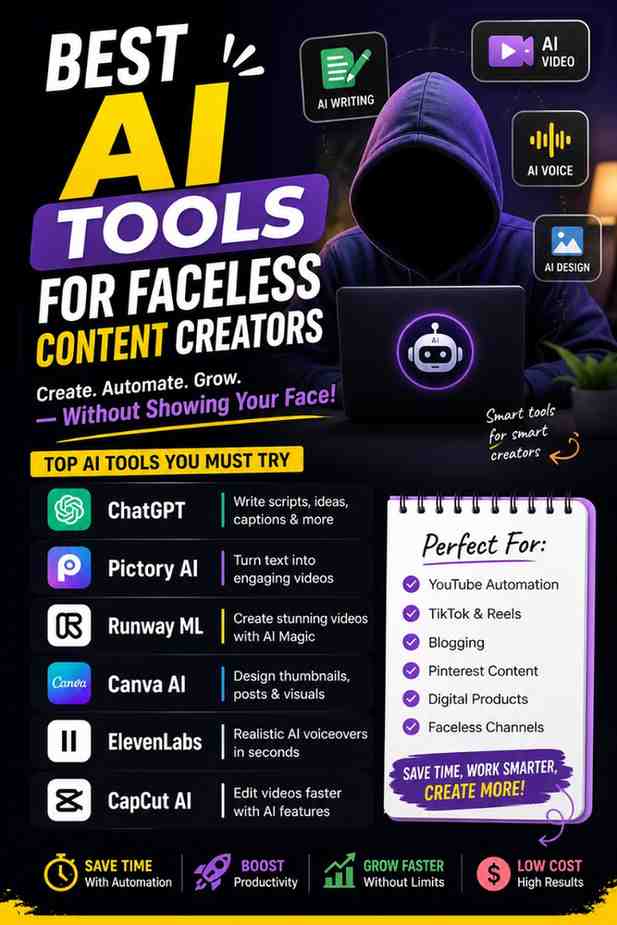
Best AI Tools for Faceless Content Creators in 2026 (Full Toolkit)
You don't need to show your face to build a successful content channel. In fact, some of the fastest-growing YouTube and TikTok channels right now belong to creators nobody has ever seen on camera.
Faceless YouTube channels have exploded in popularity since 2023, and in 2026, the combination of AI video generation, AI voiceover, and automated editing tools has turned what was once a niche strategy into one of the most scalable and profitable approaches to building a content business.
The best part? You don't need a huge budget or technical skills. You just need the right tools — and that's exactly what this guide covers.
Why Faceless Content Is Booming Right Now
Before we dive into the tools, it's worth understanding why this trend keeps growing.
Faceless content creation lets you build a profitable social media brand without ever appearing on camera. Instead of personality-driven videos, faceless creators rely on voiceovers, text overlays, stock footage, screen recordings, animations, and AI-generated visuals to deliver value to their audience.
And it's working financially. Many faceless creators report earning between $3,000 and $15,000 per month once they hit consistent publishing schedules in high-CPM niches.
There are also three big reasons why the quality of faceless content has never been better:
AI voices sound human now. Gone are the robotic, monotone narrations of three years ago.
Algorithms don't care about your face. YouTube and TikTok reward retention and consistency — not personality.
Production costs are lower. Faceless channels are operational businesses, not personal brands — they don't depend on one person's energy and availability.
The Core Faceless Content Workflow (Before the Tools)
Think of faceless content creation as a simple pipeline:
Script → Voice → Visuals → Edit → Publish
Every tool you pick should fit into one of these five stages. You don't need 10 tools. You need 4–5 of the right tools. Here's exactly what those tools are.
1. ChatGPT — Best for Writing Scripts
Stage: Scripting | Price: Free / $20/month (Plus)
Every great faceless video starts with a great script. ChatGPT is still the go-to tool for this in 2026.
ChatGPT accelerates scriptwriting by generating hooks, outlines, and SEO-optimized content that improves retention and discoverability. You can prompt it with your topic, target length, and platform format — and get a ready-to-use script in seconds.
Pro tip: Ask ChatGPT to include a bold hook or surprising statistic in the first 5 seconds. On faceless content, your opening line does the job your face can't.
2. ElevenLabs — Best for AI Voiceovers
Stage: Voiceover | Price: Free tier / Paid from $5/month
Robotic voiceover is the #1 killer of faceless channels. A bad voice makes people click off in the first 10 seconds, and there's no editing trick that fixes it.
This is where ElevenLabs stands alone. ElevenLabs has set the standard for AI text-to-speech — their voices are the most natural-sounding on the market, with realistic pacing, emotional range, and multilingual support. They also offer voice cloning, so you can build a consistent brand voice across every video you make.
If you're serious about faceless content, this is the one tool worth paying for first.
3. InVideo AI — Best All-in-One Video Generator
Stage: Video Generation | Price: Free (limited) / $28/month
InVideo AI is where your script turns into a full video — without you touching a single clip manually.
InVideo AI uses powerful AI models to generate scripts from your prompts, sifts through 16M+ stock images and videos, selects relevant content, and produces a voiceover while adding background music and transitions. It's genuinely one of the fastest ways to go from idea to finished video.
It works across YouTube, Instagram Reels, TikTok, and Shorts — making it ideal for creators who want to post on multiple platforms without doubling their workload.
4. Pictory — Best for Turning Blogs Into Videos
Stage: Video Generation | Price: From $19/month
If you have existing blog content or articles, Pictory is a game-changer. It takes your written content and transforms scripts, blog posts, or articles into engaging faceless videos with AI-selected footage and voiceovers.
It's especially useful for content repurposing — one blog post can become three or four short-form videos with minimal effort. For creators who already have written content, this tool practically runs itself.
5. CapCut — Best for Editing (Free)
Stage: Editing | Price: Free / Pro at $8/month
CapCut handles 90% of faceless editing needs — text overlays, transitions, auto-captions, and speed ramping. The learning curve is minimal, and the free version is genuinely powerful.
For faceless channel creators who build their own videos, CapCut is where the assembly happens — you import your AI-generated images or stock footage, add the voiceover from ElevenLabs, apply transitions, overlay captions, and export.
One editing tip that matters: use captions with high contrast — such as yellow text with a black stroke — to ensure readability on mobile devices, which account for over 70% of YouTube watch time.
6. Canva — Best for Thumbnails
Stage: Thumbnails & Branding | Price: Free / Pro at ~$13/month
Your thumbnail is what gets clicks. Your video is what keeps views. You need both to work.
Canva is the easiest and most popular tool for designing faceless video thumbnails. It offers thousands of templates, drag-and-drop design, and brand kit support so every thumbnail looks like it belongs to the same channel. Over 650,000 Instagram posts are tagged with #facelessmarketing, many made entirely in Canva.
7. VidIQ — Best for YouTube SEO
Stage: Optimization | Price: Free / Basic from ~$7.50/month
Creating great content isn't enough — people need to find it. VidIQ solves that.
VidIQ is a YouTube-specific SEO tool that provides keyword research (showing search volume and competition for any term), tag suggestions, competitor analysis, and trend alerts. It tells you what people are actually searching for — so you can create faceless videos around topics that already have demand.
Never write a script without checking search volume first.
The Recommended Starter Stack (By Budget)
Here's what a practical setup looks like depending on where you are:
🟢 Free Starter Stack
ChatGPT (free) → ElevenLabs (free tier) → Pexels (free stock) → CapCut (free) → Canva (free)
🟡 Pro Stack (~$50–80/month)
ElevenLabs Creator ($22) + Canva Pro ($13) + VidIQ basic ($7.50) + Pexels (free) + CapCut (free) gives you professional output for under $80/month. NemoVideo
🔵 All-in-One Stack
InVideo AI ($28) + ChatGPT Plus ($20) + Canva free → fastest path from idea to published video with minimal manual work.
Key Takeaways
You don't need expensive equipment or camera skills to build a profitable content channel in 2026.
The core workflow is simple: Script → Voice → Visuals → Edit → Publish.
ChatGPT handles scripting, ElevenLabs handles voice, InVideo AI or Pictory handles video, and CapCut handles editing.
Voice quality is the single most important investment for a faceless channel — don't skip ElevenLabs.
A professional faceless setup can cost as little as $50–80/month and compete with channels spending far more.
Faceless creators who track watch time, save rate, and share rate per post grow 3x faster than those who post blindly.
Conclusion
Faceless content creation is no longer a workaround — it's a legitimate, scalable business model. And with the AI tools available in 2026, the quality gap between faceless and traditional content has essentially closed.
You don't need to go viral on day one. You just need to pick your niche, assemble the right 4–5 tools, and stay consistent. The creators winning right now aren't the ones with the most expensive setups — they're the ones who show up regularly with useful content.
Start with the free stack. Test your niche. Then upgrade as you grow. The tools are ready — the only thing left is your first video.