How to Study Faster with AI in 2026 (3x Learning Speed Proven Methods)
Learn how to study 3x faster using AI tools with science-backed techniques. Improve memory, focus, and productivity with smarter learning strategies.
Published
22 Apr 2026
Reading Time
3 min read
Written By
Admin User
Most people don’t have a studying problem—they have a method problem.
You sit for hours, read the same page again and again, and still forget everything the next day. It’s frustrating.
But here’s the shift happening in 2026:
Students who use AI are not just studying harder—they’re studying smarter and faster.
The best part? This isn’t hype. It’s backed by cognitive science and learning psychology.
In this blog, you’ll learn how to study up to 3x faster using AI, without burning out or depending on expensive courses.
🧠 Why Traditional Studying Is Slow
Let’s be honest—most study methods are outdated.
Passive reading (low retention)
Highlighting everything (feels productive, isn’t)
Re-reading notes (time waste)
📊 What science says:
Your brain learns better when you:
Recall information (active recall)
Space repetition over time
Connect concepts
AI helps you apply all three—automatically.
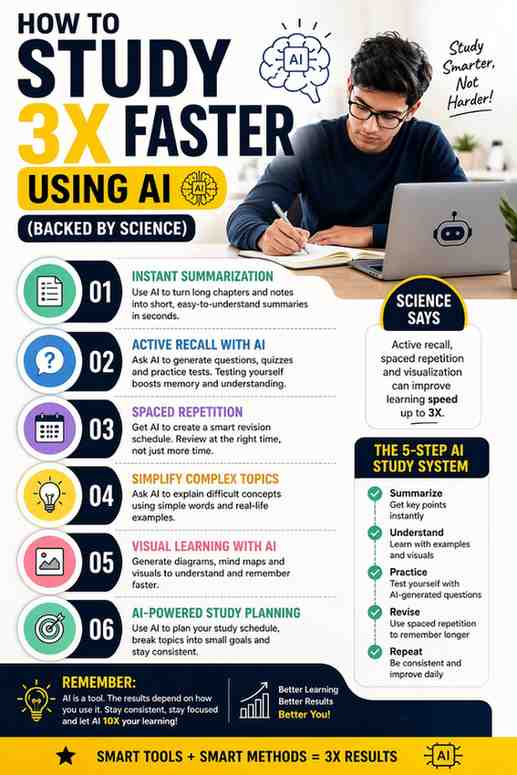
⚡ 1. Use AI for Instant Summarization
Instead of spending 2 hours reading a chapter, use AI to break it down in minutes.
👉 What to do:
Paste your notes or topic into an AI tool
Ask for a simple explanation + key points
🧠 Why it works:
Your brain processes structured information faster than raw text.
⚡ Example prompt:
“Explain this topic like I’m a beginner and give me bullet points.”
🔁 2. Practice Active Recall with AI
Reading is passive. Testing yourself is powerful.
👉 What to do:
Ask AI to:
Generate questions
Create quizzes
Give you practice tests
🧠 Why it works:
Active recall strengthens memory pathways—this is one of the most proven learning techniques.
⚡ Example prompt:
“Create 10 test questions from this topic with answers.”
⏱️ 3. Use Spaced Repetition (The Memory Hack)
Cramming doesn’t work long-term.
Instead, revise smartly using spaced repetition.
👉 What to do:
Ask AI to create revision schedules
Review topics at increasing intervals
🧠 Why it works:
Spacing information helps move it from short-term to long-term memory.
🎯 4. Turn Complex Topics into Simple Analogies
If you don’t understand something, you can’t remember it.
👉 What to do:
Ask AI:
“Explain this topic using real-life examples.”
🧠 Why it works:
Your brain remembers stories and visuals better than definitions.
🎥 5. Learn Faster with AI-Generated Visuals
Some things are easier to see than read.
👉 What to do:
Convert topics into diagrams
Use AI to visualize processes
🧠 Why it works:
Visual learning improves retention and reduces cognitive load.
🔥 6. Remove Distractions with AI Planning
Studying isn’t just about content—it’s about focus.
👉 What to do:
Use AI to create a daily study plan
Break topics into small sessions
🧠 Why it works:
Clear structure reduces procrastination.
⚖️ Reality Check: AI Is a Tool, Not Magic
AI won’t study for you.
If you:
Just copy answers
Don’t revise
Stay inconsistent
You won’t see results.
The advantage comes when you use AI to think better, not avoid thinking.
🧠 Final Study System (Simple Routine)
Here’s a practical routine you can follow:
Summarize topic using AI
Understand with examples
Practice with questions
Revise using spaced repetition
Repeat daily
Do this consistently, and your speed will naturally increase.
📌 Quick Recap
Studying faster = studying smarter
AI helps apply proven learning techniques
Active recall + spacing = best combo
Consistency beats intensity
🚀 Final Thoughts
The students who win in 2026 won’t be the ones who study the longest.
They’ll be the ones who:
Use better tools
Follow smarter systems
Stay consistent
AI is not the future of learning—it’s already here.
The only question is: Are you using it, or ignoring it?